
 Riser Chart
 Drag-and-drop riser placement for chorus directors
Built by a director who spent 40 years trying sticky notes, magnets, PowerPoint, and foam boards. Riser Chart does what all of those couldn't — let you arrange singers visually, see voice parts at a glance, and print a clean chart in seconds.
Riser Chart is a browser-based riser placement tool for chorus directors, created by Ted Chamberlain. It features drag-and-drop singer placement, color-coded voice parts (up to 24 custom parts), singer photos with timbre/resonance visual rings, four layout styles (straight, curved, grid, free-form), up to 10 rows with 40 spots each, unlimited formations grouped by event, five auto-arrange templates, canvas annotations, singer links for proximity relationships, batch editing for large rosters, CSV roster import, dark mode, read-only share links, multi-account support, branded PNG/JPG/PDF exports, print-friendly view, and opt-in Cloud Sync to access your formations and roster across all your devices. Handles 200+ singers. One-time purchase of $99 with no subscription. Works in Chrome, Edge, Firefox, and Safari.
Last updated:
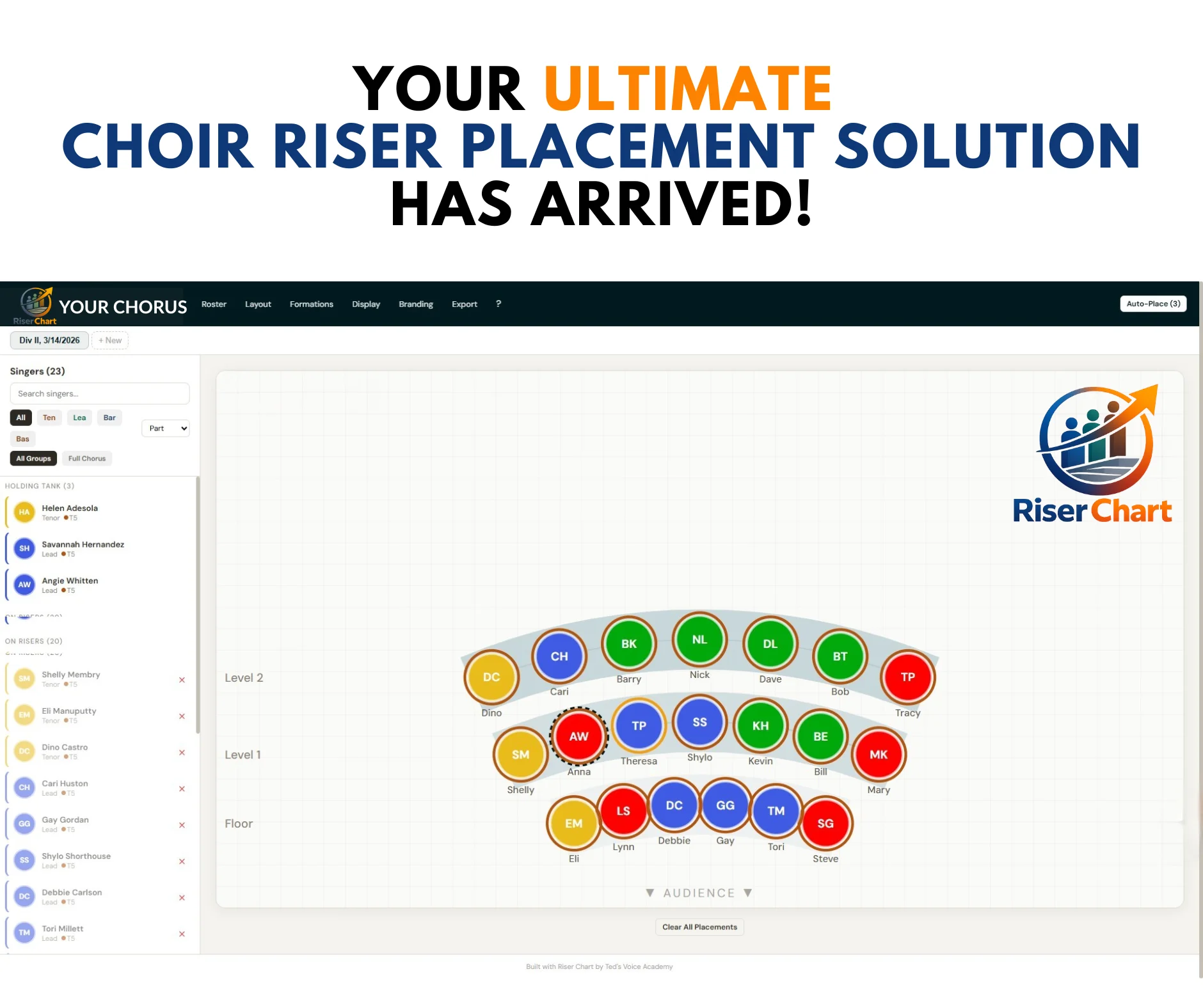
Curved riser layout with color-coded voice parts, sidebar roster, and formation tabs

I've been directing since the 1980s. I tried everything.
If you're a chorus director, you know the drill. You've got a show coming up, singers have moved around, new members joined, and you need to figure out who stands where on those risers. Again.
I spent decades looking for a good way to handle this. Seating chart tools? Made for classrooms, not risers. PowerPoint? Life is too short to drag little text boxes around slides. Cookie sheets with magnets? Worked okay — until someone bumped the table.
Sticky notes on poster board? The sticky wore off, coffee spilled, notes stuck to someone's sleeve, and the giant board took up half my office. Velcro names on foam board? Took forever to set up, and moving people was still more hassle than it was worth.
After years of settling, I finally said: it's time to build my own.
I designed Riser Chart for the way I actually work — drag a singer onto a spot, see voice parts at a glance, try a different arrangement in seconds, print a clean chart for the risers. No learning curve. No monthly fees eating away at your chorus budget.
What's inside
Everything you need to make riser placement fast, visual, and frustration-free.
Drag-and-Drop Placement
Grab a singer from the sidebar and drop them onto any riser spot. Click to place, click-to-swap two singers instantly, or Auto-Place to fill all spots by voice part in one click. Undo and redo with Ctrl+Z (up to 20 steps).
Up to 24 Custom Voice Parts
Define up to 24 voice parts with custom names and colors. Works for barbershop, SATB, show choir, a cappella — any structure. Sub-parts like Soprano 1 and Soprano 2 are supported. Voice part colors appear on the canvas, sidebar, filters, and exports.
4 Layout Styles, 10 Rows
Straight rows, curved arcs, rectangular grid, or free-form blank canvas — match your actual setup or create stage blocking diagrams. Up to 10 rows (floor plus 9 levels), with each row independently adjustable from 1 to 40 spots and custom row labels. The canvas scales automatically.
Singer Photos & Timbre Rings
Upload headshots that display inside singer circles on the canvas. Each singer gets a timbre/resonance rating (1–10) shown as a color ring — warm yellow to cool purple — so you can see vocal blend at a glance.
Formations, Events & Auto-Arrange
Create unlimited formations grouped by event. Five auto-arrange templates (Sections L→R, R→L, by Rows, Mixed, Random) get you started fast. Add text labels, rectangles, and circles as canvas annotations. Each formation keeps its own layout, placements, display mode, and group filter.
Groups & Batch Editing
Tag singers with multiple group memberships (Concert Choir, Jazz Ensemble, Chamber Singers). Filter formations by group. Ctrl+Click to select multiple singers, then change voice parts, timbre, or groups for all of them at once.
Export, Share & Print
Export as PNG, JPG, or PDF at full resolution with your branding. Generate read-only share links so section leaders can view formations in their browser — no account needed. Print-friendly view hides all UI chrome for clean rehearsal handouts.
CSV Import, Backup & Cloud Sync
Import your entire roster from a CSV spreadsheet in seconds — with a downloadable template and sample roster to get started. Back up everything as a JSON file, or enable opt-in Cloud Sync to access your formations and roster across all your devices.
Branding & Dark Mode
Custom accent color tints headers, buttons, and riser platforms. Upload your logo, B&W logo for print, and custom favicon. Toggle dark mode for dim rehearsal spaces — your preference persists across sessions. Your chorus, your look.
Singer Links (Together / Apart)
Define proximity relationships between singers. "Together" links show solid green lines — "Apart" links show dashed red lines on the canvas. Soft warnings remind you when placements conflict, but you always have the final say.
Multi-Account Support
Each access code gets its own data silo — singers, formations, groups, branding, settings. Log out and log in with a different code on the same computer. Your email appears in the header so you always know which account is active.
Guided Onboarding
A 7-step interactive tour walks new users through adding singers, building formations, using groups, exporting, and more. Replay anytime from the Help menu. Setup wizard on first launch configures voice parts, branding, and logo in minutes.
How it works
Purchase and activate
Visit riser.tedsvoiceacademy.com, purchase through secure Stripe checkout, and receive your access code by email. Enter the code and your email to unlock the app.
Run the setup wizard
A guided 4-step wizard walks you through naming your chorus, configuring up to 24 voice parts with custom colors, choosing your brand accent color, and uploading your logo.
Build your roster
Import from a CSV spreadsheet or add singers one by one. Each singer gets a profile with voice part, sub-part, timbre rating, height, photo, group memberships, and notes.
Arrange and export
Pick a layout style, set your rows and spots, then drag singers onto the canvas. Create multiple formations for different songs or events. Export branded charts as PNG, JPG, or PDF.
Built for anyone who arranges singers
Chorus directors
Concert formations for ensembles of any size, from 8 to 200+ singers across 10 rows.
Worship leaders
Arrange choir or praise team positions on stage quickly and visually.
Show choir directors
Plan choreography staging and multiple formation changes per show.
Music educators
Teach ensemble arrangement and vocal blend with a tool students can see.
A cappella groups
Organize small-group formations with full voice part and timbre control.
Community choirs
Manage large, rotating rosters with CSV import, groups, and batch editing.
One price. No subscription. Ever.
One-time purchase
- Full access to every feature — nothing held back
- Automatic updates — always the latest version
- Use on any device with your access code
- 200+ singers, 10 rows, 24 voice parts, unlimited formations
- 4 layout styles, auto-arrange, annotations, singer links, dark mode
- Share links, multi-account, Cloud Sync, JSON backup
- Email support included
No downloads. No installation. No recurring fees. Coupon codes available.
Common Questions
How do I access Riser Chart?
Riser Chart is a hosted web app — just open it in your browser at riser.tedsvoiceacademy.com. No software to install, no files to manage. After purchase, you receive an access code by email and activate with your email address. Use the same code on any device.
What voice part systems does it support?
Any voice part system you use. Define up to 24 custom voice parts with custom names and colors. Works for barbershop (Tenor, Lead, Baritone, Bass), SATB, show choir, a cappella — any ensemble structure. Sub-parts like Soprano 1 and Soprano 2 are supported.
Is my data stored in the cloud?
By default, all your chorus data — singers, formations, photos, branding — is stored locally on your device. If you enable the optional Cloud Sync feature (found in the Export menu), a copy is also stored securely in the cloud so you can keep multiple devices in sync. Cloud Sync is off by default.
Do I have to pay monthly?
No. Riser Chart is a one-time purchase of $99. No subscription, no recurring fees. All upgrades come automatically — every time you open the app, you're on the latest version.
Can I use it on multiple devices?
Yes. Activate with the same email and access code on each device. Enable Cloud Sync in the Export menu to automatically keep your data in sync across devices.
What if I don't want to use Cloud Sync?
No problem — Cloud Sync is off by default. You can transfer data manually using Export > Backup JSON on one device and Export > Restore JSON on the other.
How many singers can it handle?
Riser Chart has been tested with 200+ singers and handles large ensembles smoothly. You can have unlimited formations, each with its own riser configuration and placements.
Does it work on my phone or tablet?
Riser Chart is designed for desktop and laptop computers. The drag-and-drop interface works best with a mouse or trackpad. While it may display on tablets, the full experience requires a desktop browser (Chrome, Firefox, Safari, or Edge).
Can I import my roster from a spreadsheet?
Yes. Export your roster from Excel or Google Sheets as a CSV file, then use Roster > Import CSV. Download the CSV Template for the correct column format. Voice parts, groups, timbre ratings, height, and notes are all supported. Groups are auto-created if they don't already exist.
Can I share a formation with section leaders?
Yes. Open Export > Copy Share Link to generate a read-only URL for any formation. Paste it into an email or text message. Recipients can view your chart in their browser — no account or access code required. Share links are snapshots, so generate a new one after making changes.
Does Riser Chart have dark mode?
Yes. Toggle dark mode in the Display menu. It applies to the entire UI — header, sidebar, menus, modals, and canvas background. Your preference persists across sessions. Exports always use the standard light theme regardless of your display setting.
What is free-form layout?
Free-form gives you a blank canvas with no riser rows or grid. Place singers anywhere by dragging or clicking — ideal for stage blocking, non-traditional formations, or any arrangement where singers don't stand on risers. All other features (swap, annotations, export) work normally.
Can I use multiple accounts on the same computer?
Yes. Each access code gets its own data silo — singers, formations, groups, branding, settings. Log out from the Help menu, then log in with a different code. Works seamlessly with Cloud Sync. Your email appears in the header so you always know which account is active.
Ready to stop fighting with sticky notes?
Riser Chart gives you the visual, drag-and-drop riser placement tool that directors have been wishing for. Built from four decades of directing experience — and available for less than the cost of one rehearsal rental.
Get Access — $99Questions? Email support@tedsvoiceacademy.com · Browse all products