 Intonation Lab
 Train your ear to sing in perfect tune
Pianos are tuned to a compromise. Voices don't have to be. Intonation Lab teaches your ear to hear and produce the pure intervals that make chords ring — using real-time pitch detection, AI coaching feedback, just intonation targets, and visual feedback you can see and feel.
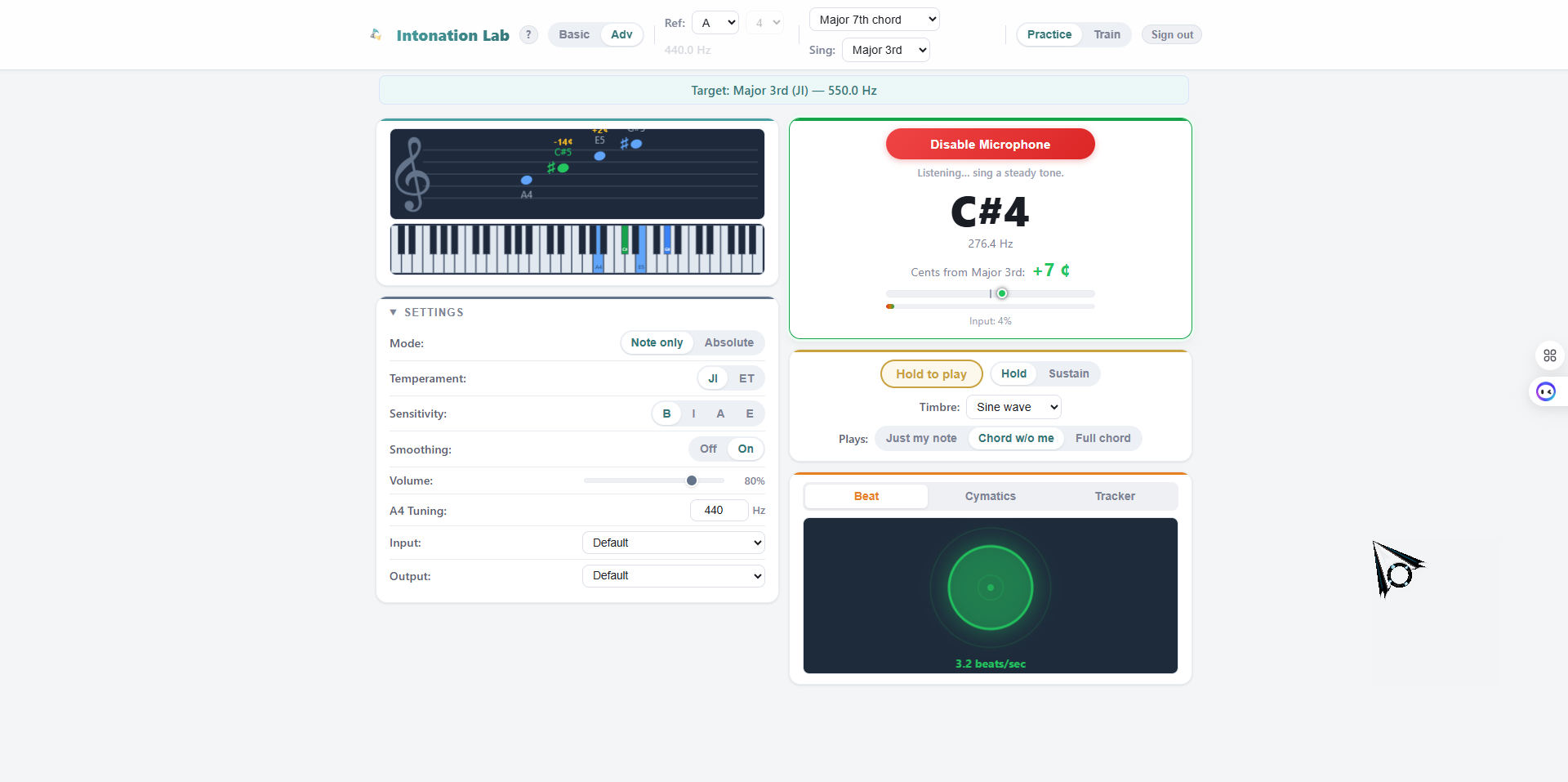
Intonation Lab is a browser-based ear training tool for singers, created by Ted Chamberlain. It uses real-time pitch detection and AI coaching feedback to help singers develop precise intonation using just intonation — the pure tuning system based on natural harmonic ratios. Features include 29 intervals and chords, 13 timbres, a beat frequency visualization, cymatics display, pitch tracker with recording and playback, drone mode, JI vs ET comparison, dark mode, and a 52-exercise guided curriculum with four difficulty levels. A free demo is available with no sign-up required. Pricing starts at $99 for individuals, with group licenses up to $999 for choruses. Installable as a Progressive Web App on any device.
Last updated:
Pianos are out of tune. On purpose.
Every piano in the world uses equal temperament — a tuning system that slightly detunes every interval so all 12 keys sound equally acceptable. It's a practical compromise, and for keyboards it works well enough.
But singers aren't keyboards. When you sing a major third that matches a piano, you're actually 14 cents sharp of the pure, resonant interval. When a barbershop quartet or choir locks into a chord that rings with an almost physical buzz, they're singing in just intonation — pure ratios that equal temperament can only approximate.
When a chord locks in, you can feel it. That's just intonation.
The challenge is training your ear to hear and produce these pure intervals reliably. That's what Intonation Lab is built to do.
What's inside
Nine core capabilities that work together to build your intonation skills — from hearing the difference to singing it consistently.
29 Intervals + Chords
13 melodic intervals from unison through octave, plus 16 chord types including triads, 7ths, suspensions, power chords, and extended harmonies like dominant 9th and add9. Every target is calculated using just intonation ratios.
AI Coaching Feedback
Real-time coaching tips based on your pitch patterns. Detects sharp or flat bias, pitch instability, near-misses, and excellent accuracy — then gives specific advice like adjusting breath support or relaxing your jaw. All analysis runs locally in your browser.
Beat Frequency Circle
A pulsing ring that wobbles at the actual beat rate between your voice and the target. Still and green when you're in tune, wobbling red when you're off. Learning to see and hear these beats is one of the most powerful ways to develop intonation.
Cymatics Visualization
A mandala-like geometric pattern that stays stable and symmetric when you're in tune, then rotates and distorts as you drift. Expand any visualization to fullscreen for an immersive experience.
13 Timbres + Drone Mode
Hear your reference pitch as sine wave, oboe, violin, piano, organ, trumpet, flute, or six vocal timbres. Turn on drone mode for a continuous background reference tone so you can practice hands-free. Adjust arpeggio speed to hear chord tones one at a time.
Pitch Tracker + Recording
A scrolling line chart shows your pitch in real time. Record your practice session (pitch data only, no audio), then replay it to review accuracy and spot patterns you can't hear in the moment.
52-Exercise Curriculum
A guided training system that progresses from easy intervals to hard ones, at increasing accuracy requirements. Four difficulty levels from beginner (±25 cents) to expert (±5 cents). Progress tracking and diagnostic feedback after each exercise.
JI vs ET Comparison
Hear any interval played in just intonation, then in equal temperament, back to back. This side-by-side comparison makes the difference between the two tuning systems immediately audible — even to ears that haven’t trained to hear it yet.
Works Everywhere
Runs in any modern browser on desktop, tablet, or phone. Install as a Progressive Web App for an app-like experience with offline support. Dark mode, accessibility features, and an onboarding tour for new users. Try the free demo with no sign-up required.
How it works
Try the free demo or get access
The free demo gives you three intervals (Unison, Perfect 5th, Octave) with full visualizations and AI coaching — no sign-up required. Purchase an access code to unlock all 29 intervals and chords, the training curriculum, and recording.
Choose your interval or chord
Select any of 13 intervals (unison through octave) or 16 chord types. The app calculates the exact just intonation target frequency. Use the JI vs ET comparison to hear the difference between tuning systems.
Enable your microphone and sing
Grant microphone access and Intonation Lab starts analyzing your pitch in real time. The beat frequency circle, cymatics pattern, pitch tracker, and AI coaching all respond instantly. Color shifts from red to amber to green as you approach the target.
Train, record, and review
Follow 52 structured exercises that progressively challenge your ear. Record your practice sessions to review your pitch patterns. Track your progress across all intervals and difficulty levels.
Choose your license
Individual access or group licenses for quartets, ensembles, and choruses. All access codes are delivered instantly by email.
Single
1 access code
Full access for one singer. Works across all your devices with the same code and email.
Get AccessQuartet
4 access codes
One code per member. Train individually between rehearsals and build ensemble intonation skills together.
Get AccessEnsemble
12 access codes
For small ensembles and a cappella groups. Distribute codes to your members and track collective progress.
Get AccessChorus
40 access codes
For full choruses and large vocal ensembles. Give every section access to systematic ear training.
Get AccessCommon Questions
What is just intonation and why does it matter for singers?
Just intonation is a tuning system based on pure harmonic ratios — the natural relationships between frequencies. When singers tune to these pure ratios rather than piano tuning (equal temperament), chords ring with clarity and resonance. It's the difference between a chord that sounds good and one that locks in with a physical buzz you can feel.
Do I need special equipment?
Just a device with a microphone and a modern web browser. Intonation Lab works on desktop, tablet, and phone — you can also install it as a Progressive Web App for an app-like experience. No downloads required. A USB microphone or headset can improve accuracy, but built-in microphones work fine for most users.
What's the difference between the license tiers?
Single ($99) gives one person access. Quartet ($299) includes 4 access codes — one per member. Ensemble ($499) includes 12 codes for small groups. Chorus ($999) includes 40 codes for large ensembles. All access codes are delivered instantly by email after purchase.
Is Intonation Lab only for advanced singers?
Intonation Lab is designed for all levels. Beginners can start in Basic mode with a generous accuracy window of ±25 cents and an interactive onboarding tour. The guided curriculum progresses gradually from easy intervals to harder ones. Advanced and expert sensitivity levels challenge even professional singers.
How is this different from a regular tuner?
Standard tuners tell you if a single note is sharp or flat relative to equal temperament. Intonation Lab understands musical context — it knows what interval or chord tone you're aiming for, calculates the exact just intonation target, and shows you through multiple visualizations how close you are. It also provides AI coaching feedback, lets you record and review your sessions, and includes a JI vs ET comparison so you can hear the difference between tuning systems. It trains your ear, not just your eyes.
Can I use it on my phone?
Yes. Intonation Lab runs in any modern browser on desktop, tablet, or phone. The responsive layout adapts automatically. You can install it as a Progressive Web App for an app-like experience. Dark mode matches your system preference automatically. Your settings and training progress are saved in your browser.
Ready to train your ear?
Try the free demo right now — three intervals with full visualizations, AI coaching, and pitch detection. No sign-up required. Or pair Intonation Lab with private coaching for even faster results.
Questions? Email ted@tedsvoiceacademy.com · Browse all products